Tips for Working with Claude Code
From the creator of Claude Code

Boris Cherny, Creator of Claude Code shared some really useful tips as to his workflow for using Claude Code on X ( 👉

All 13 detailed steps can be found in Boris’s X thread above (or in ThreadReader 👉 https://threadreaderapp.com/thread/2007179832300581177.html).
The most interesting observations from his workflow are:
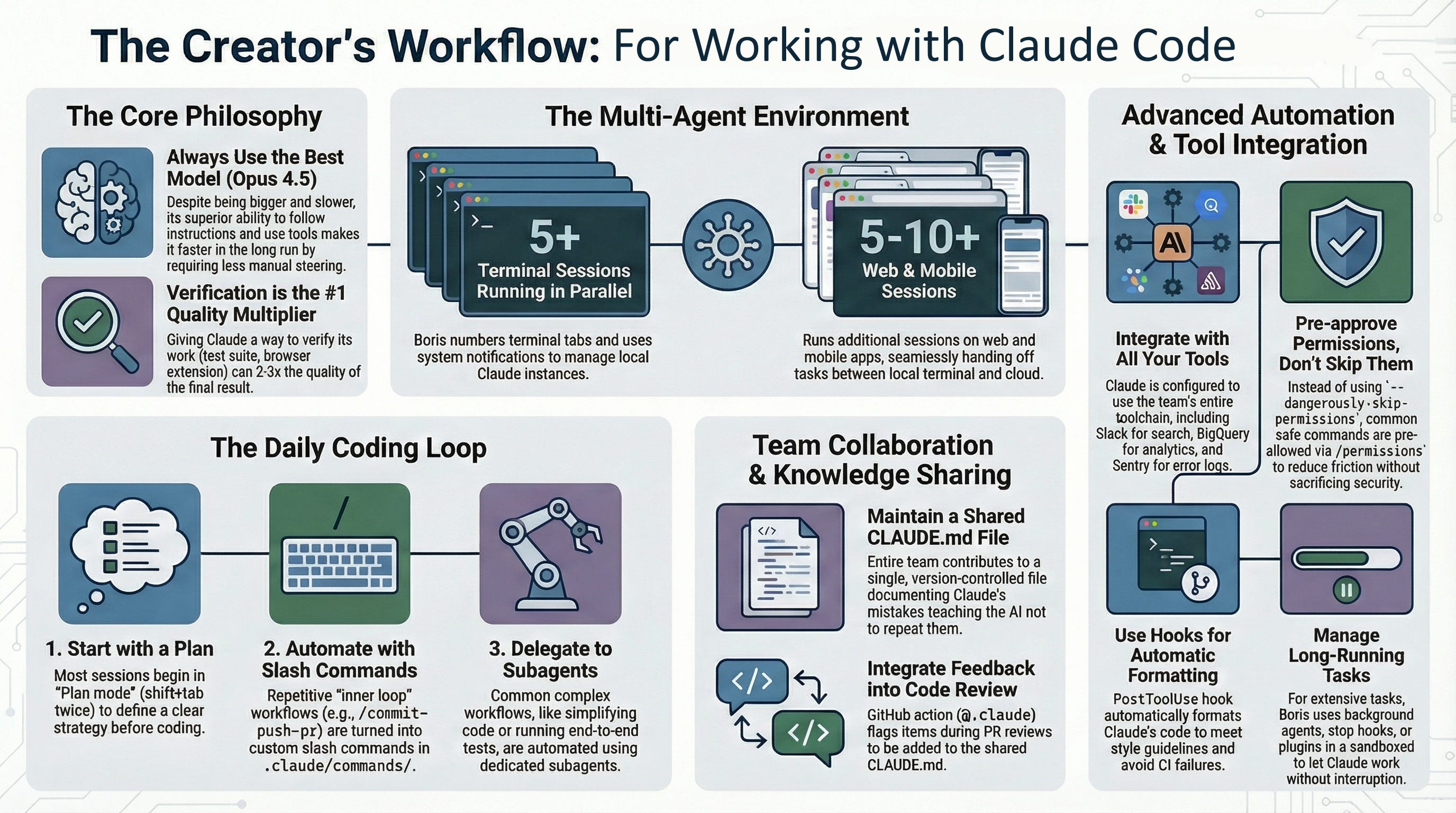
➡️ Boris runs 5 Claudes in his terminal and 5–10 sessions on the web simultaneously, numbering his tabs and using system notifications to track when they need input.
➡️ He treats local and web sessions as fluid, using commands like --teleport to move context back and forth, or handing off local sessions to the web using the & operator.
➡️ He initiates sessions from his phone in the morning to check later, maintaining a continuous workflow throughout the day.
➡️ He has a preference for “Thinking” Models over Speed (contrary to the common trend of using smaller, faster models for code), Boris exclusively uses Opus 4.5 with thinking.
➡️ His reasoning is that while the model is slower and larger than Sonnet, it requires less human steering and handles tools better.
➡️ Consequently, he observes that using the most capable model is “almost always faster... in the end” because it reduces the back-and-forth required to fix errors.
➡️ The team treats the AI’s context as a living, version-controlled documentation project. They share a single CLAUDE.md file checked into Git, which serves as a rulebook for the AI.
➡️ Improvement is continuous as whenever Claude makes a mistake, the team updates CLAUDE.md so the error isn’t repeated.
➡️ During code reviews, Boris tags @.claude on pull requests to automatically add new learnings to the CLAUDE.md file, a practice they refer to as “Compounding Engineering”.
➡️ Structured Planning and Verification Boris emphasizes that the “Plan mode” (triggered by shift+tab twice) is critical. He iterates on a plan with Claude until satisfied before allowing the AI to write code, often enabling the model to “1-shot” the implementation.
➡️ He identifies the ability to verify work as the most important factor for quality. For example, Claude actually tests the UI changes it makes using a Chrome extension to ensure the “UX feels good”.
➡️ The workflow relies heavily on custom automation to reduce friction for repetitive tasks:
➡️ Slash Commands: He uses custom commands (e.g., /commit-push-pr) that execute inline bash scripts to handle Git operations efficiently.
➡️ He deploys specialized sub agents for specific phases of development, such as code-simplifier for cleanup or verify-app for end-to-end testing.
➡️ Rather than globally skipping permission checks (which can be dangerous), he pre-allows specific, safe bash commands in a shared configuration file (.claude/settings.json)